

Fortnite Item Shop Guide: Reset Times, Skins, V-Bucks and Refunds

Fortnite Item Shop Guide: Reset Times, Skins, V-Bucks and Refunds
The Fortnite Item Shop is easy to understand until the skin you want suddenly disappears.
Epic rotates cosmetics in and out of the shop regularly.
Some outfits stay for several days, while others leave much sooner. A collaboration skin might return after a few weeks, or it could remain unavailable for a year with no clear explanation.
Because of that, players often have the same questions:
- When does the shop reset?
- Will a skin return?
- Can you refund something bought by mistake?
This guide explains how the Item Shop works and what you should check before spending your V-Bucks.
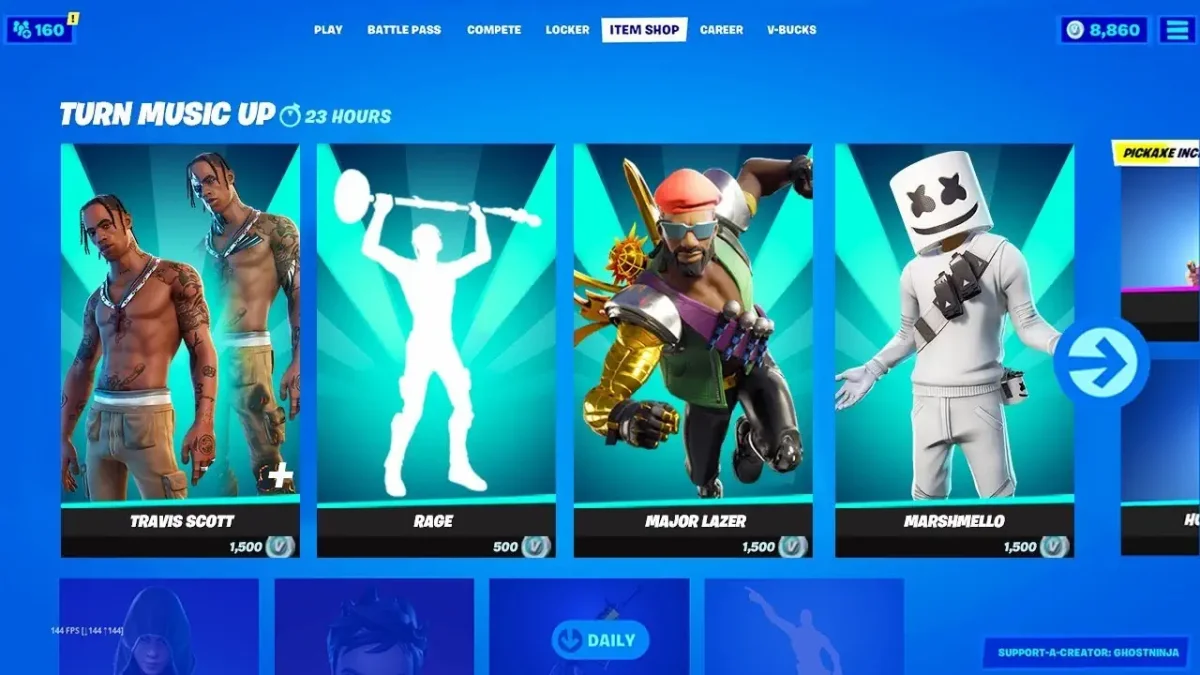
What Is the Fortnite Item Shop?
The Item Shop is Fortnite’s main store for cosmetic content.
This is where players buy outfits, emotes, harvesting tools, wraps, gliders and matching sets.
The available selection changes regularly, so the shop rarely looks exactly the same for long.
You may find:
- Character outfits
- Back blings
- Pickaxes
- Gliders
- Weapon wraps
- Emotes
- Jam Tracks
- Cosmetic bundles
Most of these items only affect appearance.
Buying an expensive outfit will not increase your damage, improve your aim or give you extra health.
The main purpose of Item Shop purchases is personalization.
When Does the Fortnite Shop Change?
The Item Shop rotates on a regular schedule.
Fortnite displays the time according to your local time zone, meaning you usually do not need to convert the reset from another region.
The confusing part is that a shop reset does not always remove every item.
One section may change while another remains available for several more days.
Large collaborations and seasonal collections often stay longer than individual daily cosmetics.
Epic now shows an expected leaving date on supported item pages.
Check that date instead of assuming the cosmetic will disappear during the next reset.
It gives you a much better idea of how long you actually have to decide.
How to Check What Is Available Today
The easiest option is opening Fortnite and visiting the Shop tab.
Everything currently available on your account will appear there, including outfits, bundles, tracks and other offers.
You can also browse through the official Fortnite Web Shop.
The Web Shop is useful when you are away from your console or gaming PC but still want to see the current rotation.
Supported purchases can be made without launching Fortnite.
Before buying anything online, look at the account name carefully.
Players who own several Epic accounts sometimes purchase a cosmetic on the wrong profile.
The item remains connected to that account rather than automatically moving to the one they normally play on.
What Can You Purchase?
The Item Shop is no longer limited to individual character skins.
Depending on the current rotation, it may include cosmetics, V-Bucks, passes, music and subscription offers.
Common examples include:
- Individual outfits
- Matching cosmetic sets
- Starter packs
- Real-money bundles
- Fortnite passes
- Jam Tracks
- Fortnite Crew
- V-Bucks
Pay attention to the payment method.
Some offers use V-Bucks, while others require real money.
A pack displayed next to regular skins may not be purchasable with your existing V-Bucks balance.
The description explains what is included and how the purchase is charged.
How Much Do Fortnite Skins Cost?
There is no universal price for Fortnite outfits.
A simple skin normally costs less than a bundle containing several matching cosmetics.
Larger packs may include:
- A back bling
- A pickaxe
- An emote
- A wrap
- Additional styles
Bundles can sometimes provide better value, especially when you already planned to buy multiple items from the same set.
Fortnite may reduce the bundle price when you already own some included cosmetics.
However, a discount does not automatically make something worth buying.
Open the bundle and inspect every item before spending your V-Bucks.
If you only want the outfit, paying extra for cosmetics you never use may not be a good deal.
Do Skins Return After Leaving?
Many Item Shop skins return eventually.
The problem is that Epic rarely gives players a reliable schedule.
A cosmetic may return because of:
- A new season
- A holiday event
- A game update
- A collaboration
- A related film release
- A new bundle
- The return of a themed collection
Original Fortnite cosmetics are often easier to bring back because Epic controls them directly.
Licensed characters can be more complicated.
A Marvel, Star Wars, anime, or music-related skin may depend on an agreement with the outside company that owns the character or brand.
That is why some licensed outfits appear repeatedly while others remain unavailable for long periods.
Leaving the Item Shop does not necessarily mean a skin is gone forever.
It only means there may be no way to predict exactly when it will return.
Why Some Cosmetics Stay Longer
Not every Item Shop section follows the same timer.
A normal featured outfit may rotate quickly, while a major collaboration remains available for a week or longer.
Event collections may stay until the related event ends.
This is why looking only at the main shop reset can be misleading.
Always open the cosmetic itself and check its planned departure date.
That date may still change, but it is more useful than assuming every item follows one shared countdown.
How Does Gifting Work?
Eligible Item Shop cosmetics can be sent to friends.
Before confirming a gift, make sure:
- The item supports gifting
- You have enough V-Bucks
- The recipient is on your friends list
- The recipient does not already own it
- Your account meets Epic’s gifting requirements
Security settings and minimum friendship periods may also apply.
Check the username carefully before pressing the final button.
Gifted purchases are generally not handled like normal purchases and usually cannot be returned through the standard refund system.
Sending a cosmetic to the wrong person can therefore be difficult or impossible to reverse.
Can You Cancel a Purchase?
Some eligible V-Bucks purchases can be cancelled shortly after buying them.
The Cancel Purchase option may remain available for up to 24 hours, provided the cosmetic has not been used or equipped.
This is useful when you accidentally select the wrong item or immediately change your mind.
Do not equip the cosmetic while deciding.
Using it may remove the cancellation option, even if the purchase was made only a few minutes earlier.
How Do Return Tickets Work?
For older eligible purchases, Fortnite uses Return Tickets.
A ticket can be used on qualifying items purchased during the previous 30 days.
When the refund is accepted, the cosmetic is removed and the spent V-Bucks are returned.
Accounts can hold up to three Return Tickets.
One ticket is restored every 365 days until the account reaches the maximum again.
Because tickets return slowly, save them for purchases you genuinely regret instead of using them every time you stop liking a skin.
Certain purchases cannot be returned, including:
- Gifts
- Pass levels
- Some packs
- Other excluded offers
The refund menu will show which recent purchases are eligible.
Do V-Bucks Work Across Every Platform?
Your cosmetics are tied to your Epic Games account and can generally be used across supported platforms linked to that account.
V-Bucks can be slightly more confusing.
A balance purchased on one platform may not always appear exactly the same when signing in somewhere else.
This can make it look like some currency is missing.
Before purchasing additional V-Bucks, check the platform where the original balance was added.
Your outfits may still be available across devices even when the displayed V-Bucks amount is different.
Should You Buy a Skin Before It Leaves?
The Item Shop is designed to create urgency.
Seeing a leaving date can make a cosmetic feel more valuable than it really is.
You may worry that skipping it now means never seeing it again.
Before buying, ask yourself whether you actually plan to use it.
Useful questions include:
- Do I like the full outfit or only one style?
- Do I already own a similar skin?
- Am I buying the bundle only for one cosmetic?
- Would I rather save V-Bucks for another collaboration?
- Am I interested only because it is leaving soon?
Many cosmetics eventually return.
There are exceptions, especially with licensed items, but buying something you do not really want is usually worse than missing one rotation.
Final Thoughts
The Fortnite Item Shop changes often, but not every item follows the exact same schedule.
Use the expected leaving date shown on the cosmetic page instead of relying only on the general reset timer.
Before purchasing, confirm the Epic account, inspect the full bundle and check whether the offer uses V-Bucks or real money.
Many skins return after leaving, although Epic rarely announces their next appearance in advance.
Licensed collaborations can be especially unpredictable because they depend on outside partnerships.
Spend V-Bucks on cosmetics you genuinely like, not simply because a countdown makes the decision feel urgent.
0 Comments
Recommended Comments
There are no comments to display.