
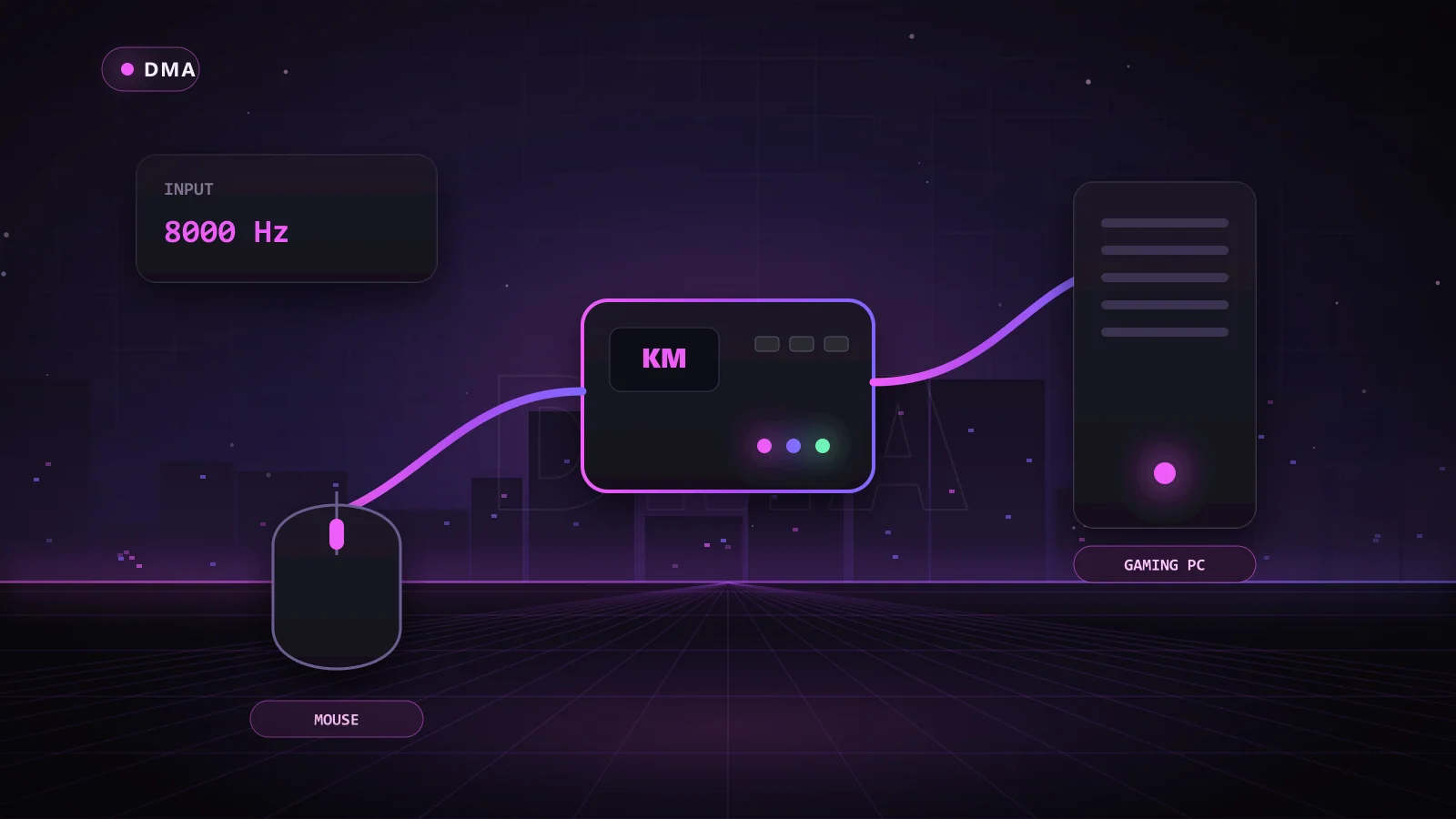
A KMBox is a small hardware box that sits between your mouse and your gaming PC. It passes your normal input straight through, but it can also take movement and click commands from a second PC and send them to the gaming PC as if they came from your own hand. In a DMA rig, that is what turns ESP data into smooth aim assistance and triggerbot shots.
The name is short for "keyboard and mouse box." This guide explains how these devices work, the real differences between the B+ and Net models, and why more and more players are choosing the Chams DMA Makcu instead. If you want aim features from your DMA card, this is the piece that makes them happen.
Key Takeaways
- An input device turns the second PC's aim calculations into real mouse movement on the gaming PC.
- The gaming PC sees one ordinary USB mouse, not a program moving the cursor.
- The B+ talks to the second PC over a USB serial link; the Net uses a network connection.
- You only need one for aim features. ESP, radar and loot markers work without it.
- The Chams DMA Makcu is an open-source, full pass-through alternative that works with your native mouse software.
What Does a KMBox Do?
Think of it as a translator on your desk. Your mouse plugs into the device, and the device plugs into the gaming PC. As far as the gaming PC is concerned, you simply have a mouse connected.
The difference is the second connection. The second PC, which runs your DMA software, can tell the device to move the cursor a few pixels, click a button or hold a key. The device blends those instructions with what your real hand is doing and sends one combined stream of input to the gaming PC.
That is a big deal for DMA users. Your aim assistance is generated on a separate machine and arrives as hardware input, so nothing on the gaming PC is moving your mouse.
Why DMA Players Pair an Input Device With Their Card
A DMA card reads game memory and sends it to the second PC. That is enough for ESP and radar, but it does not move your crosshair. To use aim features, the second PC needs a path back to your mouse.
- The DMA card reads player positions on the gaming PC.
- The second PC works out where your crosshair should go.
- The second PC sends a movement command to the input device.
- The input device passes that movement to the gaming PC as mouse input.
Our DMA setup walkthrough shows exactly where the device sits in the chain.
B+ vs Net vs Makcu: The Comparison
The two KMBox models players ask about most are the B+ (often sold as B+ Pro) and the Net. Both do the same basic job; the difference is how they talk to the second PC. The Makcu is the newer alternative that Chams sells directly.
| Feature | B+ | Net | Chams DMA Makcu |
|---|---|---|---|
| Link to second PC | USB serial | Network (Ethernet) | USB, two cables included |
| Command handling | Good for most uses | Generally quicker, more room for frequent commands | Built for fast, smooth pass-through |
| Setup | Simple, select the port | Needs a network connection configured | No wiring, no hardware locking |
| Mouse software | Varies | Varies | Works with native mouse software |
| Firmware | Closed | Closed | Open-source with active development |
| Device emulation | Basic | Basic | Advanced emulation of real device descriptors |
When the B+ makes sense
The B+ is the straightforward choice. It uses a familiar USB serial connection and handles typical aim features well. If a product you already own lists it, it gets the job done.
When the Net makes sense
The Net is aimed at players who want the quickest, most consistent link. A network connection can carry commands more frequently than a basic serial link. The trade-off is a slightly more involved setup.
Why the Makcu is the upgrade
The Chams DMA Makcu is the cheap upgrade path from older boxes. It gives you full pass-through, works with your native mouse software, and uses advanced emulation that accurately replicates real device descriptors, so your setup still looks like a normal mouse. The firmware is open source and actively developed, and every unit comes professionally assembled with two USB cables. There is no wiring and no hardware locking.
Which Chams Products Support Input Devices?
An input device is only useful if your game's DMA software can talk to it. Here are Chams products that list hardware input support:
- Valorant RKX DMA: optimized for Makcu, Ferrum and the Net, with variable X/Y smoothing, per-weapon settings, a weapon chamber state check, a velocity check and a raytrace-based triggerbot.
- Marvel Rivals Polarity DMA: works with KM Box B Pro, Net or Arduino hardware, with hero-specific settings, projectile prediction, target prioritization by role and a triggerbot with reaction time control.
- Rust Vex DMA: built for KMBox and Makcu hardware with no memory writing, per-weapon configs, recoil control with X/Y compensation and a shareable web radar.
- Apex Vex DMA: per-weapon aimbot and triggerbot with hardware input support, prediction and grenade aimbot.
- Valorant 1PC Colorbot: a one-PC color-based aimbot for Makcu, Ferrum and Net hardware, with WindMouse and Bezier movement modes and a recoil control system.
Want the whole rig at once? The Chams DMA 75t Bundle includes a Makcu alongside the 75t card, your choice of firmware tier and a Dichen 6th Gen fuser, so aim features work out of the box with supported products.
Setting Up Your Input Device in Four Steps
Getting an input device running is one of the easier parts of a DMA rig. The exact screens depend on your game's software, but the order is always the same:
- Plug in your mouse: your mouse goes into the device, and the device goes into a USB port on the gaming PC. Your mouse should work exactly as before.
- Connect the second PC: run the second cable from the device to the second PC. With the Makcu, both USB cables are in the box.
- Select the device in your software: in your DMA product's menu, choose the device type you own, such as Makcu, Ferrum or Net.
- Tune your settings: start with a small FOV, moderate smoothing and a short reaction delay, then adjust until the movement feels natural.
Because the Makcu works with your native mouse software, your DPI, polling and button settings stay just as you had them. That means less time configuring and more time playing, and if anything does not show up as expected, Chams support can help you get it recognized.
Is an Input Device the Same as an Aimbot?
No. The device has no idea what game you are playing or where any enemy is. It only moves the mouse when told to. The decisions come from the DMA software on the second PC. In other words, the box is the hands and the software is the brain.
That is why software quality matters so much. Good DMA products give you smoothing, humanized movement, reaction delays and FOV limits, so the input the device sends looks like a skilled player, not a robot.
Detection and Staying Under the Radar
Moving input generation off the gaming PC removes a whole category of software checks, but it is not a free pass. Anti-cheat can look at USB device details, and server-side systems watch for inhuman tracking and identical reaction times. Players watch too.
- Choose a device with accurate descriptor emulation, like the Makcu.
- Use smoothing and reaction delay settings instead of instant snaps.
- Check the Chams status page for the live status of your product before each session.
Do You Need an Input Device at All?
Only if you want aim features. Plenty of DMA users run visual features only, such as ESP, item highlights and radar, and skip the extra hardware. You can always add one later without changing anything else.
- Visual-only: card, firmware, second PC and a display method.
- Visual plus aim: add a Makcu or a supported B+ or Net.
- Not sure: start without one, or take the bundle and have it ready.
Why Choose Chams
- Hardware and software that match: the Makcu, cards, firmware, fusers and the DMA products that support them, all in one place.
- Real support: help getting your input device recognized by your game's software.
- Live status and frequent updates: a public status page and products maintained as games patch.
- Flexible keys: day, week and month options on most DMA products, with keys delivered automatically right after payment.
Frequently Asked Questions
What does KMBox stand for?
Keyboard and mouse box. It sits in your keyboard and mouse connection and can add input on top of what you physically do.
Is the Net better than the B+?
The Net is generally quicker at handling commands because it uses a network link, but it takes a little more setup. Both work well with supported software.
Is the Makcu a KMBox replacement?
Yes. It does the same job with full pass-through, native mouse software support and open-source firmware, and products such as Rust Vex DMA and Valorant RKX DMA support it.
Can I use an input device without a DMA card?
Some one-PC products, such as Valorant 1PC Colorbot, use a Makcu, Ferrum or Net without a DMA card. Most DMA products need both.
Does it work with my wireless mouse?
Most standard USB mice work. Unusual devices and some wireless dongles can behave differently, so ask support if you are unsure.
Add Smooth Hardware Aim to Your Setup
An input device is the final piece that turns DMA data into hits. Pick up the Chams DMA Makcu for a modern KMBox alternative, then browse the full range of cards, firmware and fusers on the DMA hardware page.